How to Choose a PoE Switch for Your Security Camera System
When most people plan a security camera system, they focus on the cameras and the NVR - and rightly so. But there is a critical piece of infrastructure that sits between them and is responsible for both powering the cameras and carrying their video data: the PoE switch.
Choose the wrong PoE switch and you will run into cameras that randomly reboot, video that drops frames, or a system that simply will not power all your cameras at full resolution. Choose the right one and your surveillance system runs invisibly - exactly as it should.
What Is PoE and Why Does It Matter for Security Cameras?
Power over Ethernet (PoE) is a technology that delivers electrical power through a standard Ethernet cable, alongside data. For IP cameras, this means you only need to run a single Cat5e or Cat6 cable from your switch to each camera - no separate power cable, no nearby electrical outlet required at each camera location.
This dramatically simplifies installation, reduces cabling costs, and gives you far more flexibility in where you mount cameras. A camera mounted under an eave 150 feet from the nearest electrical outlet can be powered entirely through its network cable.
PoE vs. PoE+ vs. PoE++: Which Standard Do You Need?
Not all PoE is the same. The three main standards deliver different maximum power per port:
- PoE (802.3af) - up to 15.4W per port. Sufficient for most standard fixed IP cameras (bullet and dome).
- PoE+ (802.3at) - up to 30W per port. Required for PTZ cameras, cameras with built-in heaters, and cameras with high-powered IR LEDs. This is the most common standard for professional installations.
- PoE++ (802.3bt) - up to 60W or 90W per port. Required for very high-end PTZ cameras and some access control terminals.
Always check the power draw specification of your camera from its datasheet and choose a switch standard that exceeds that number. PoE+ will also power standard PoE cameras, so PoE+ is the safe default for most professional deployments.
The Critical Number: Total PoE Budget
The single most important specification on a PoE switch is its total PoE power budget - the maximum combined wattage the switch can deliver across all PoE ports simultaneously.
A switch might have 16 PoE+ ports (each capable of 30W), but if the total PoE budget is only 150W, it cannot power all 16 ports at 30W at the same time. Exceeding the budget causes the switch to either reduce power to some cameras or shut ports down entirely.
Here is how to calculate your required budget:
- Look up the maximum power draw of each camera model (in watts) from its datasheet
- Add up the power draw of all cameras in the system
- Add a 20-25% headroom buffer for peak power events (startup spikes, cold weather heater activation)
- Choose a switch whose total PoE budget exceeds this number
Example: 8 cameras x 12W each = 96W total draw. Add 25% buffer = 120W minimum PoE budget required.
Port Count: How Many Cameras Per Switch?
Match the switch port count to your camera count, with some room to grow:
- Small systems (1-8 cameras) - An 8-port PoE+ switch with 2 uplink ports.
- Medium systems (8-24 cameras) - A 16 or 24-port PoE+ switch. Look for models with SFP slots for fiber uplink capability if the NVR is more than 100 meters away.
- Large systems (24+ cameras) - A managed 48-port PoE+ switch with 10G SFP uplinks. At this scale, management features become important for network segmentation and traffic prioritization.
Managed vs. Unmanaged PoE Switches
An unmanaged switch is plug-and-play - connect it, power it, done. Fine for small, dedicated surveillance networks with no other devices on the same switch.
A managed switch lets you configure VLANs (to isolate camera traffic), set QoS rules (to prioritize video data), monitor port statistics, and remotely reboot individual camera ports. For any system larger than 8 cameras, or any installation where cameras share a network with other business systems, a managed switch is strongly recommended.
Uplink Speed: Do Not Bottleneck Your Video
Each IP camera generates continuous video data - typically 2-8 Mbps per camera at 4K/8MP resolution. The uplink port connecting your PoE switch to the NVR or your main network must handle the combined bandwidth of all cameras simultaneously.
- 8 cameras x 6 Mbps = 48 Mbps - a single Gigabit (1G) uplink handles this comfortably
- 32 cameras x 6 Mbps = 192 Mbps - still within a 1G uplink, but near the ceiling
- 48 cameras at 4K = 288+ Mbps - requires a 10G SFP uplink to avoid congestion
Silarius PoE Switches for Security Camera Installations
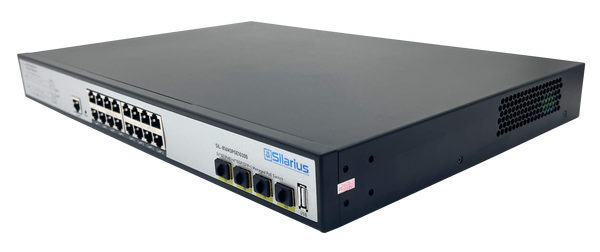
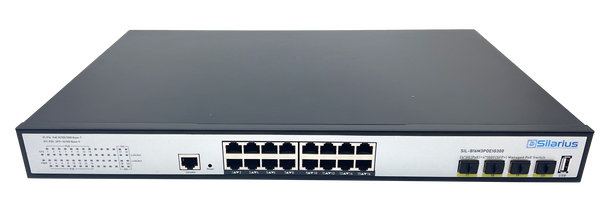
Silarius offers a full range of PoE+ switches purpose-built for security camera deployments:
- SIL-A8POE1G120 - 8 PoE+ ports, 2 Gigabit uplinks, 2 SFP slots, 120W budget. Ideal for 4-8 camera systems.
- SIL-A16POE1G150 - 16 PoE+ ports, 2 Gigabit uplinks, 2 SFP slots, 150W budget. Mid-size installations.
- SIL-A24POE1G450 - 24 PoE+ ports, 4 Gigabit uplinks, 4 SFP slots, 450W budget. Handles up to 24 high-power cameras.
- SIL-A48M3POE1G800 - 48 PoE+ ports, 4x10G SFP uplinks, 800W budget, L3 managed. Enterprise campus deployments.
View all Silarius PoE switches
Quick Reference: PoE Switch Selection Checklist
- Confirm camera power draw (W) from each camera datasheet
- Calculate total system power draw + 25% buffer
- Choose PoE+ (802.3at) as the default standard
- Select port count equal to camera count plus 2 spare ports minimum
- Verify uplink speed is sufficient for total camera bandwidth
- Choose managed if 8 or more cameras or shared network
- Add SFP uplink if NVR is more than 100m away or if you anticipate growth